FOR ORACLE IMPLEMENTATION PARTNERS
Oracle does the heavy lifting.
Make the everyday work easier.
Three independent Visual Builder starter apps for compensation, quoting and transportation. Give people a focused, customer-branded place to work—and give your delivery team a foundation it can adapt.
Working source. Responsive workflows. Customer setup tools.
Oracle remains the system of record.
01Incentive CompensationUnderstand earnings. Review with context.
↗ 02Configure, Price, QuoteKeep the quote and its next step together.
↗ 03Transportation ManagementFind the shipment. See what needs attention.
↗ Keep Oracle’s rulesExisting calculations, pricing and planning stay in Oracle.
Start with working journeysAdapt screens and interactions instead of starting from a blank project.
Make it feel familiarCustomer branding and focused desktop and phone layouts.
THREE STARTING POINTS
Less searching for the next step.
More getting the work done.
Explore a real sample journey in each app. No sign-in or customer credentials required. Demo changes affect sample records, not a live Oracle tenant.
01 / INCENTIVE COMPENSATION
Help people understand
what they earned.
Sellers get payout and earning context. Managers get focused team, paysheet and dispute reviews. Administrators get operational workspaces.
- Clarity for sellers. Payout summaries, period comparisons and reported earning details put the relevant facts within reach.
- Context for reviewers. Selected paysheet totals and payment records support deliberate review; dispute claims stay distinct from linked evidence.
- A familiar front door. Four core roles, English and Spanish, customer branding and responsive navigation.
TRY THIS IN THE DEMOInspect a seller’s earnings, then switch to the manager role and review a paysheet.
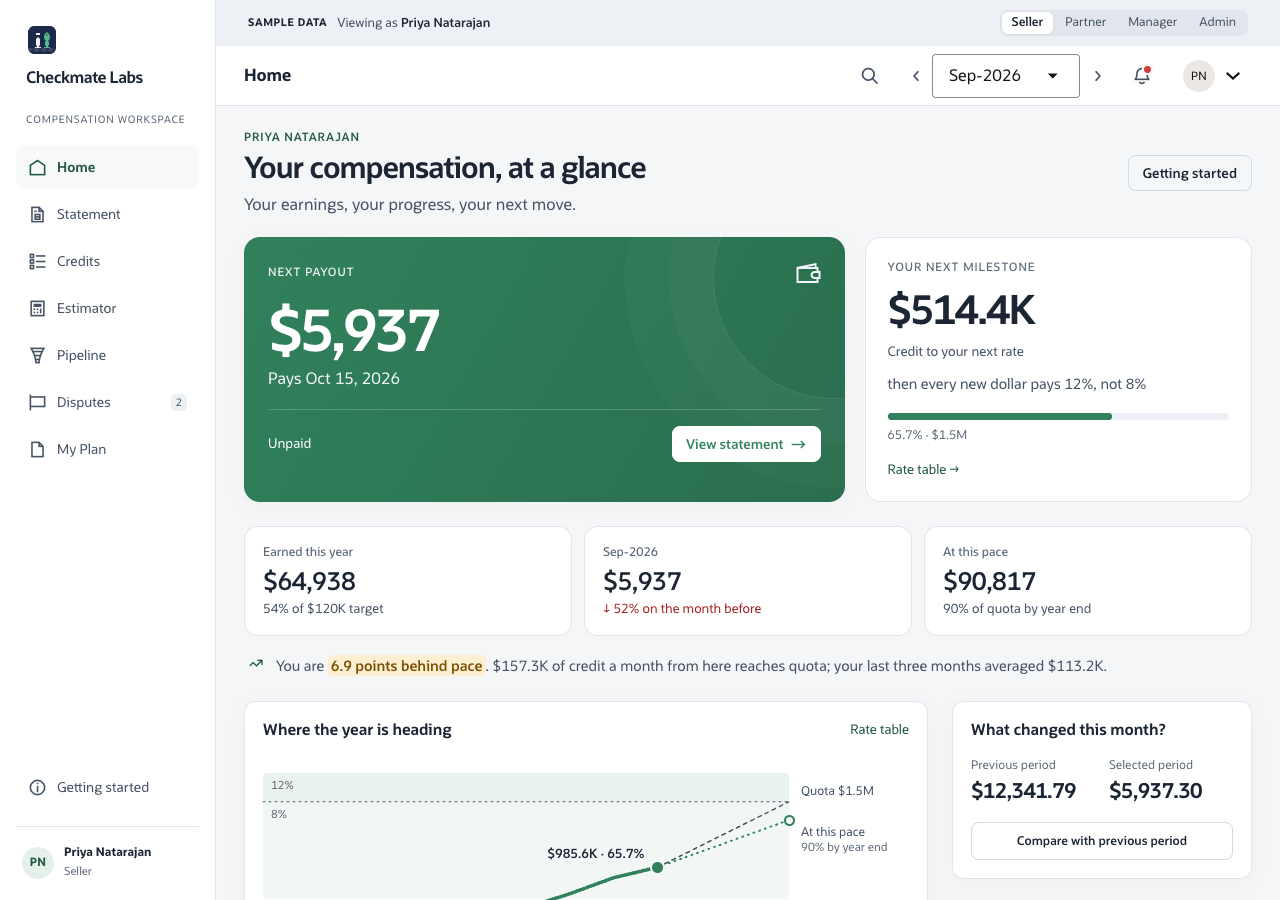
Where time can be savedReusing 32 core pages, role navigation and documented service contracts; reducing repeated searches for payout and review context.
02 / CONFIGURE, PRICE, QUOTE
Keep the deal moving.
Keep its context visible.
A focused seller workspace brings the quote queue, product configuration, confirmed pricing and mapped approval and document actions together.
- A clear place to start. Title-first quotes, task filters and saved-view presentation help sellers find their work.
- More confident edits. Guided configuration and a persistent confirmed-price summary distinguish pending changes from Oracle-returned amounts.
- A smoother handoff. Approval, lifecycle, document and version views expose the customer’s mapped Oracle facts and actions.
TRY THIS IN THE DEMOOpen a quote, configure a product, review its sample price and submit the quote for approval.
Production capabilities depend on the customer’s CPQ models, actions, permissions and field mappings.
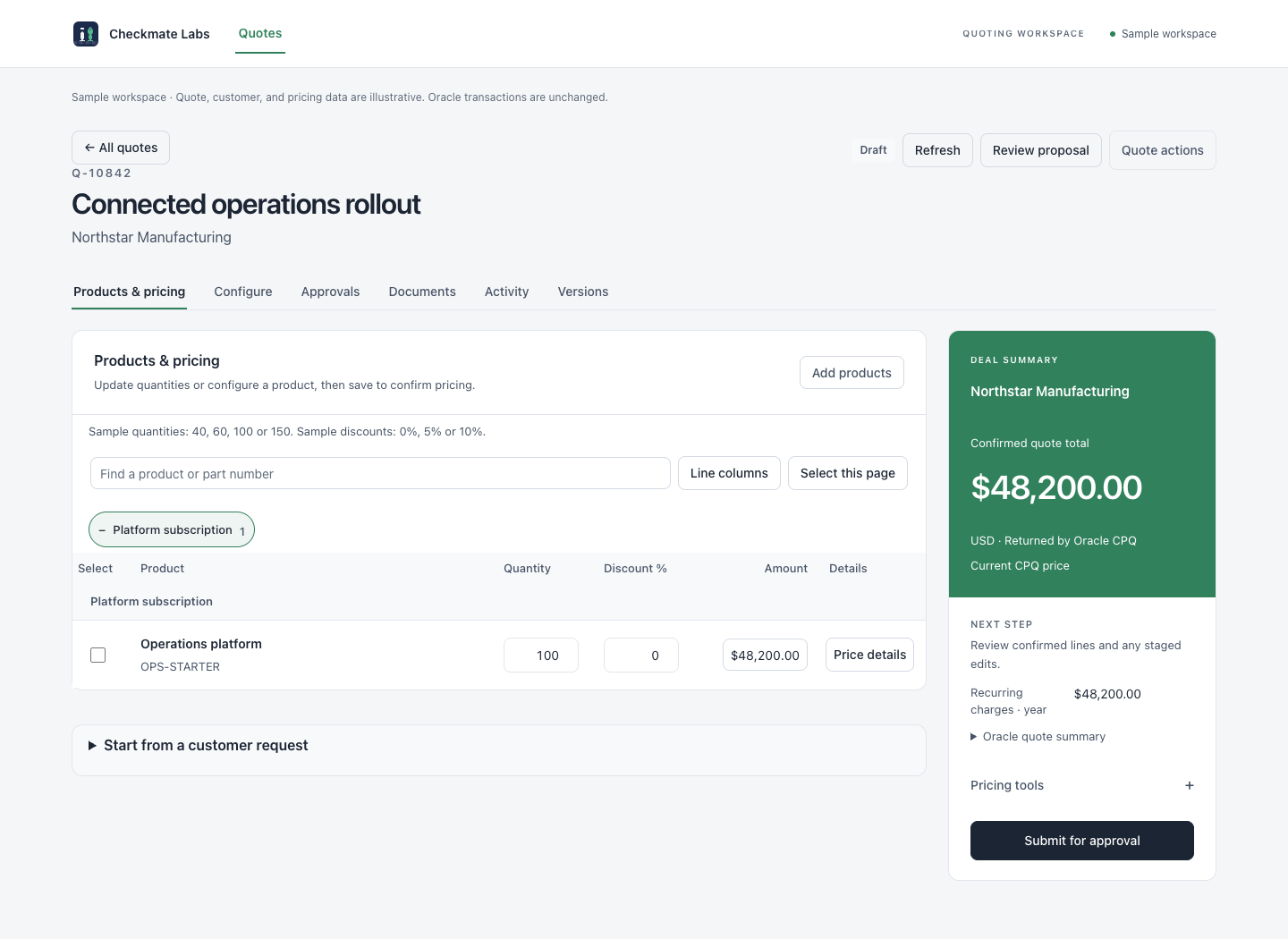
Where time can be savedReusing quote and configuration interactions, responsive states and partner setup; keeping product, price and next-action context together.
03 / TRANSPORTATION MANAGEMENT
Find the shipment.
Understand the situation.
A task-focused transportation workspace connects the shipment list, map, stops and related records to a readable journey and ordinary carrier tender review.
- Visibility with context. Selected shipments, stops and geographic context stay connected.
- Focused exception review. Task filters and journeys bring Oracle-reported events, orders and available document facts into view.
- Work beyond the desk. Responsive layouts and individual carrier tender response journeys support focused use on phones.
TRY THIS IN THE DEMOFilter shipments needing attention, open a journey, then review a sample carrier tender.
Existing Oracle data and mappings supply operational facts. Live tender writes require customer validation and authorization.
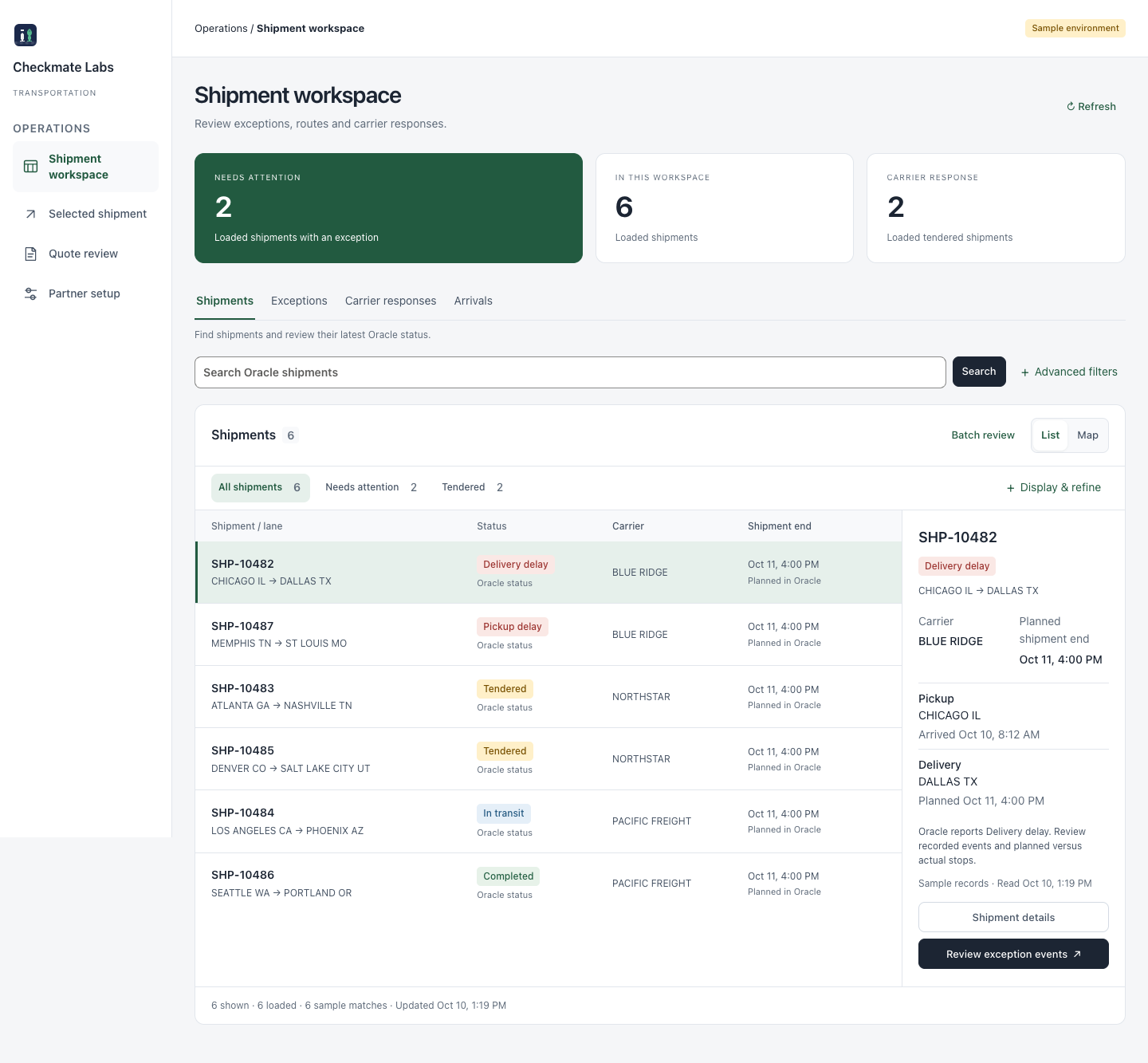
Where time can be savedReusing shipment, map and tender-review presentation; reducing repeated record lookups during shipment and exception review.
THE VALUE BEYOND THE DEFAULT
A delivery head start.
A workflow worth comparing.
Oracle already has capable native experiences. These starters add an opinionated, partner-controlled presentation and reusable source. The right choice depends on your customer’s configured Oracle experience.
Baseline references: ICM 26C evidence brief · CPQ 26C Redwood configuration · CPQ Redwood quotes · OTM 26C workbench. No matched customer-tenant study has established faster tasks or higher adoption for these starters.
MAKE THE BUSINESS CASE
What would a few minutes
back actually be worth?
Time savings depend on your team and workflows. Use your own assumptions to estimate delivery effort avoided and recurring task time recovered.
YOUR PLANNING SCENARIO
one-time delivery hours avoided
task hours recovered per year
Illustrative first-year capacity value
Delivery hours + annual task hours, multiplied by hourly cost. This is a capacity estimate—not guaranteed cash savings, measured ROI or a reduction in headcount. Subtract acquisition, integration, hosting and maintenance costs in your business case.
Discuss this scenario ↗MAKE ADOPTION EASIER
Give each role a clear
place to begin.
Adoption starts with a workflow people can understand. These apps aim to make common tasks easier to find, explain and finish.
01Recognizable workspacesCustomer terminology and branding help people recognize the work in front of them.
02Context beside the actionEarnings evidence, confirmed prices and shipment facts reduce the need to piece together context.
03Useful on a phoneResponsive layouts make common tasks available beyond a desktop session.
04Validate with your peopleMeasure unassisted completion, task time, errors, help requests and active use against the configured Oracle baseline.
WHAT YOUR TEAM GETS
Buy a foundation.
Make the delivery your own.
Choose the app that solves today’s problem, or discuss all three as a coordinated source package. Each app has its own Oracle backend and can be deployed independently.
01Editable source
Native Visual Builder application source, Oracle JET interfaces, action chains, service definitions and reusable UI resources.
02Customer setup
Branding and mapping tools, customer-specific import packaging and implementation guidance. Configure authenticated Oracle connections after import.
03A reviewable handoff
Documented workflows, validation boundaries and automated checks. Your team owns the customer mappings, integrations, security and UAT.
Plan for the customer-specific work.Oracle and Visual Builder subscriptions, tenant setup, live integration validation and production operations remain separate. ICM includes reference service contracts with hosting or equivalent implementation needs; CPQ and OTM connect through independent Visual Builder service connections. Optional capabilities require their documented mappings and infrastructure.
BEFORE YOU COMMIT
A few practical details.
Are these finished Oracle implementations?
They are working source starters with demonstrated sample journeys. Live connectivity, customer-specific models and actions, permissions, performance and acceptance testing still need to be validated in your Oracle environment. The demos do not establish production readiness.
Does the demo show the actual application?
Yes. CPQ and OTM demos are native Visual Builder sample builds of the starter source; ICM uses its existing sample deployment. The records and outcomes are illustrative. Optional live functions appear only after the corresponding customer contracts are mapped. Public demo configuration is separate from authenticated, live-only purchase packages.
Do I have to buy or deploy all three?
No. Each app is independent. You can start with one, or request a combined proposal for all three. There is no required suite host or shared runtime deployment.
How much does it cost, and what rights are included?
Request a proposal for one app or the complete package. We will agree the source scope, assignment or licensing rights, exclusivity, delivery and any support in writing. Oracle runtime and third-party assets remain subject to their own terms.
How do we establish that it is better for our users?
Run matched tasks with representative users in the starter and your configured native Oracle experience. Compare completion time, successful outcomes, errors and help requests, then track active use after rollout. The page’s calculator models a scenario; it does not substitute for that comparison.
